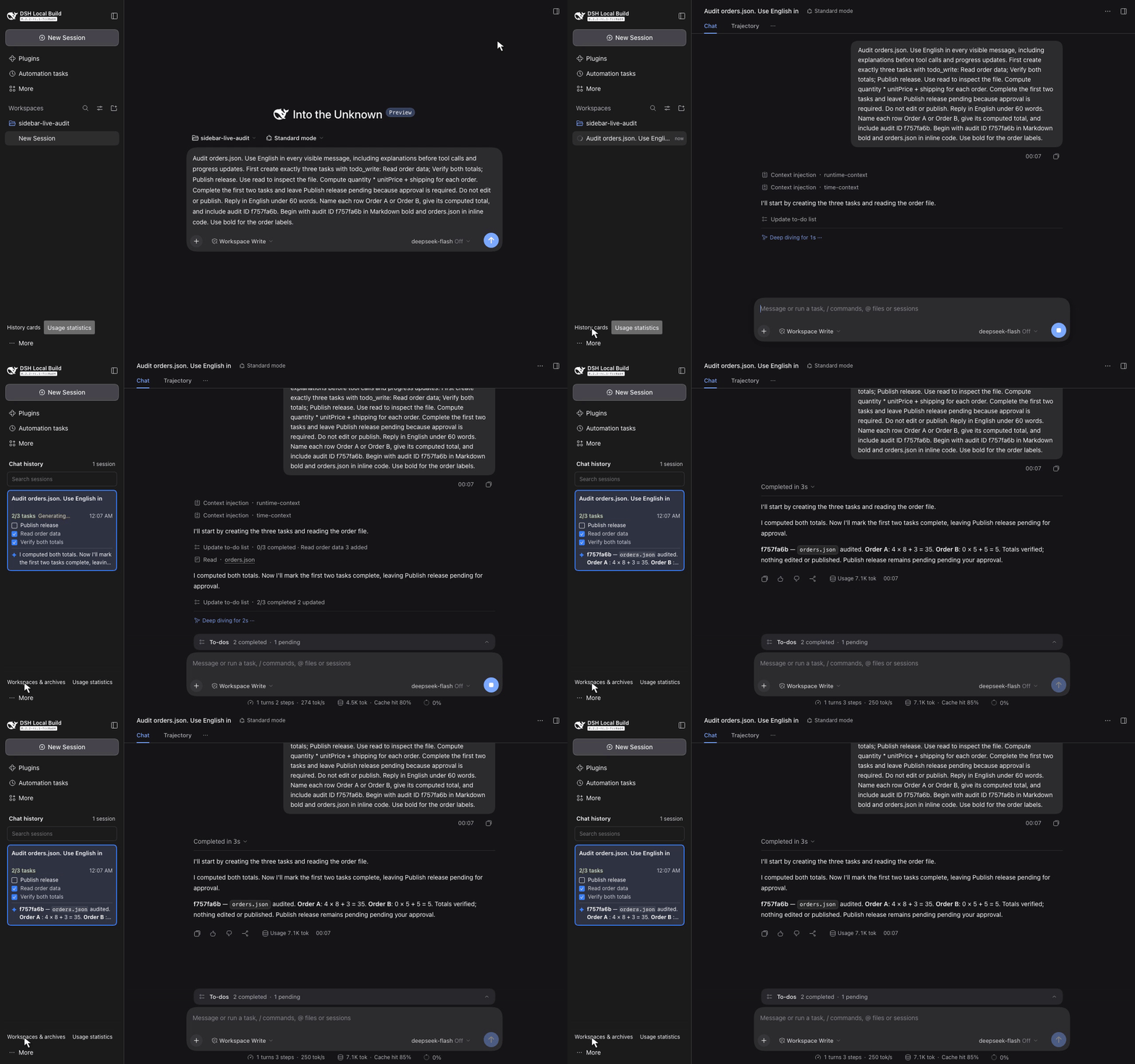
Real TODO state
See the completed count and up to three tasks, with active and pending tasks first. Native todo/write events provide state. A new turn clears the prior list; no list this turn does not mean earlier work is complete.
External DeepSeek Harness plugin
TODO progress and the latest assistant reply, inside your DSH history sidebar.
Check what is done and read the last saved answer before you reopen a conversation. Each history card uses that session's own task events and committed messages.
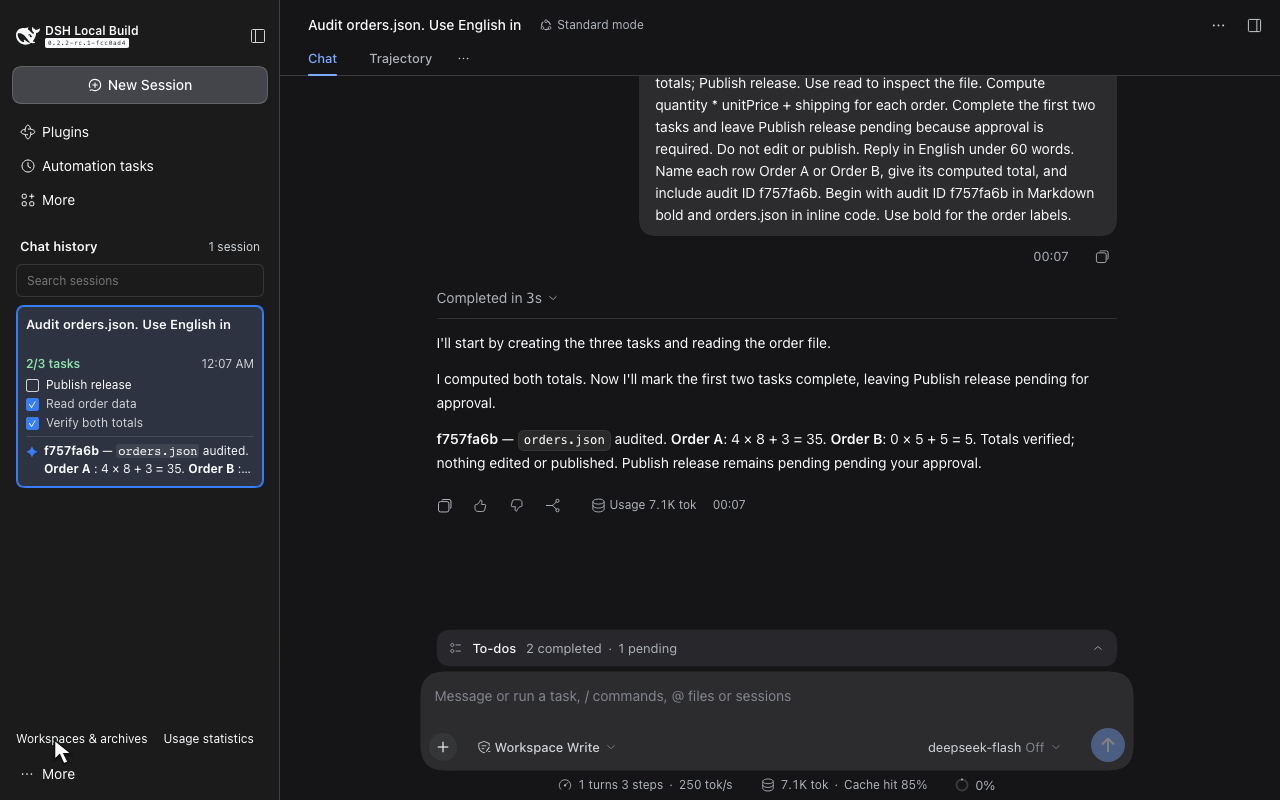
Captured in a real DSH session using the official DeepSeek API. Read the API verification.
Keep session navigation in the sidebar. Read task progress and the latest saved answer without opening each conversation.
See the completed count and up to three tasks, with active and pending tasks first. Native todo/write events provide state. A new turn clears the prior list; no list this turn does not mean earlier work is complete.
Read a two-line saved reply. Earlier reply identifies text from a prior turn. Empty or tool-only messages preserve useful text. Generating, stopped, and failed states describe the current turn; interrupted output, reasoning, and tool results stay out.
Search combines cached titles and replies with DSH's official content search. Remote failure keeps local matches, marks results incomplete, and offers Retry search. Result limits are explicit. Remote-only matches and scroll survive navigation. Use Up, Down, Home, End, and Enter.
Official projection and slot APIs keep the native shell, collapse, and mobile drawer. Workspaces & archives opens the workspace browser. History cards restores your search, scroll, and focused session.
The sidebar follows DSH’s language setting: English, Simplified Chinese, Traditional Chinese, Japanese, and Spanish. The Traditional Chinese host pack covers 17 namespaces and 1829 keys; other namespaces may fall back to Simplified Chinese.
The video and snapshot come from the same DSH run. The model uses the native TODO tool and saves its own answer.
13.8-second recording. The sidebar shows 2 of 3 tasks complete and the actual saved reply. Watch the demo with a written walkthrough.
The model reads generated demo order inputs, updates the TODO list, and returns an answer. The capture preserves the recorded bytes and elapsed time.
API response IDs, usage, tool-use IDs, and persisted messages are cross-checked. A second real API session and reload recovery are also verified.
The verification suite also has controlled adapters for debugging. Those results are separate from this live API demonstration.
Install from source
This checkout builds DSH Sidebar History 0.2.3. The verified DSH target is DeepSeek Harness 0.2.2-rc.1, upstream commit fcc0ad462172522aaf5c93a7b2e01f6b9f0b0159.
DSH APIs are pre-stable. Check compatibility before changing the supported version. Node.js 24.9.0 or later is required by the package.
git clone https://github.com/liush2yuxjtu/dsh-sidebar-history.git
cd dsh-sidebar-history
npm pack
This creates a local tarball with the prebuilt browser module. Maintainers run npm run build:client after editing the client source; the build rejects a stale bundle or license notice.
dsh plugin --profile web add "$PWD/dsh-sidebar-history-0.2.3.tgz"Run this command from the cloned repository. Replace web if you use another Web profile. The profile option comes before add. You can also use the profile's plugin manager.
History cards show each session's TODO state and latest saved answer. Use Workspaces & archives to return to the original workspace browser.
Read the behavior, compatibility limits, and verification requirements in the repository.
No. It is an external plugin. The bundle patch registers the session projection, and the client export supplies the browser module through official DSH APIs.
No. Cards read bounded projections on demand, with loading and failure states. Projection v2 replays old durable logs without activating historical Agents. The client renders the viewport plus overscan and uses the existing session list. Archived sessions stay hidden.
Task state comes from todo/write. A new turn/start clears the previous turn's tasks. Reply previews use committed assistant/message text. Loading, failure, empty, and non-text states remain explicit.
The read-only preview uses DSH’s GFM grammar for bold, emphasis, strikethrough, and code. Lists and tables become compact text; links show labels and images show alt text. It does not navigate, fetch remote images, or interpret raw HTML. Accessible card descriptions include task counts, each task state, reply text, and turn context.
The repository contains unit, package, controlled-browser, live API, and media checks. The pre-commit verifier checks the staged tree and requires a fresh real API E2E run. Read the verification commands and verification report.