New message, new session
Each message in the Chats composer starts an independent DSH session. Separate tasks keep separate histories.
DEEPSEEK HARNESS · OPEN SOURCE
Start a task in the list. Continue it in a thread. Find your work again with session titles, assistant summaries, and TODO progress.
Community plugin · MIT · Tested on DSH 0.2.2-rc.1
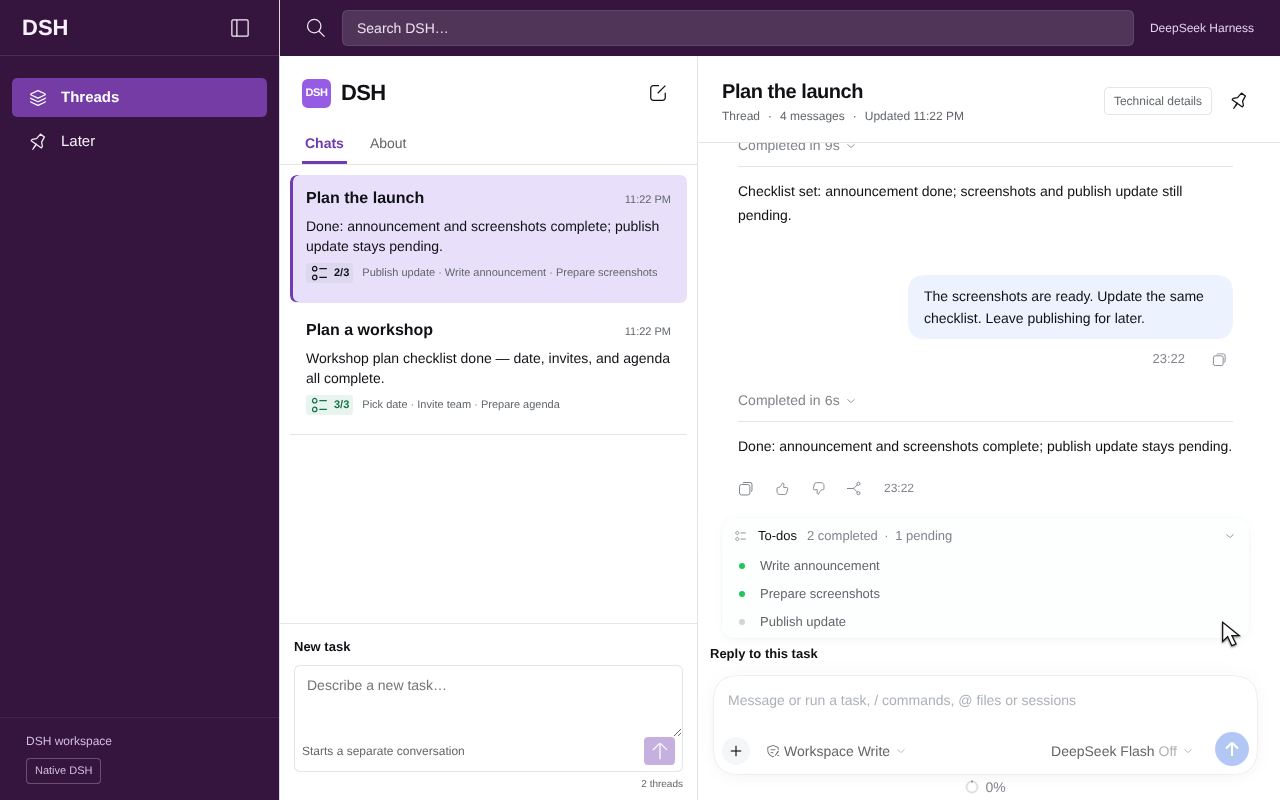
Captured on GPT Work Linux. The complete recording preserves actual model waits.
FROM TASK TO RESULT
Each message in the Chats composer starts an independent DSH session. Separate tasks keep separate histories.
Select the task and reply in its Thread composer. The same session keeps earlier conversation and tool context.
The session entry shows the assistant summary and real TODO count. Expand the native checklist for details.
BUILT AROUND NATIVE DSH
The plugin reuses the native DSH message renderer, tool calls, and composer. The host persists sessions so you can continue after a reload.
Choose Native DSH to open Settings and Plugins. Return to the threaded interface with your unsent draft preserved.
Read the workflow guideSEE IT BEFORE YOU INSTALL
Each language recording has six official API response records. The 8-second clip shows navigation. The full recording shows session creation and updates.
This is liush2yuxjtu/dsh-slack, the Slack-style session UI for DSH. It does not connect to Slack or require a Slack account. Shared channels, mention-only execution, and cross-session channel memory are outside this version.